Run it yourself
Run Not Yet on your computer.
Three steps. You get your own Flagsmith, a demo experiment and the Not Yet UI. Everything stays on your machine, and the demo traffic is simulated by our scripts.
- DockerDocker with Compose, running.
- PythonPython 3.10 or newer.
- Ports8501 (Flagsmith) and 8511 (UI) free.
Get the code
Download the repository as a ZIP or clone it, then open a terminal in the project folder. The folder may be named differently if you downloaded a ZIP.
cd t2-not-yet
Start it
One script starts Flagsmith and Postgres in Docker, sets up a Python environment, creates a demo experiment with simulated traffic, and runs the tests. The first run pulls Docker images, so it can take a while. We have not timed a cold run.
./quickstart.sh
It is done when you see SMOKE OK and then a green test run. It is safe to run again. Each run adds a new demo experiment.
Open it
Start the UI, leave that terminal open, then open the address in your browser.
.venv/bin/python src/ui/server.py
http://localhost:8511/?live=1
Your own local stack only. The Propose and Approve buttons change the rollout of the demo experiment in the Flagsmith that step 2 started on your computer. They talk to nothing else. Do not point this at a Flagsmith you care about.
What you should see
A verdict of NOT_YET.
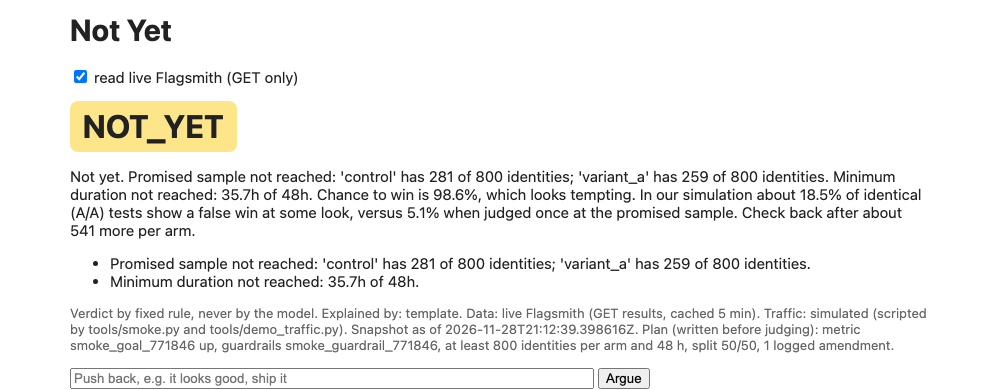
NOT_YET, whatever the chance to win says.No Docker? The offline example needs no Flagsmith: run ./notyet check prereg.example.json --stats stats.example.json for a verdict in the terminal, or python3 src/ui/server.py and open http://localhost:8511 for the UI on the example file. Both read scripted numbers, not a live experiment.
If it does not work
- A port is already in use.Pick another port for Flagsmith or the UI.
Terminal
FS_PORT=18501 ./quickstart.sh
# the UI port: NOTYET_UI_PORT=8512 .venv/bin/python src/ui/server.py
- "Python 3.10+ not found".Install a newer Python (on macOS,
brew install python@3.11) and point the script at it.TerminalPYTHON=/path/to/python3.11 ./quickstart.sh - It stops while waiting for Flagsmith, or the UI says it cannot read it.Check that Docker is running and give it a minute, then run
./quickstart.shagain. The bootstrap step waits up to 120 seconds, and re-running is safe.
To stop the stack later, run docker compose stop in the project folder. quickstart.sh itself never runs docker compose down.